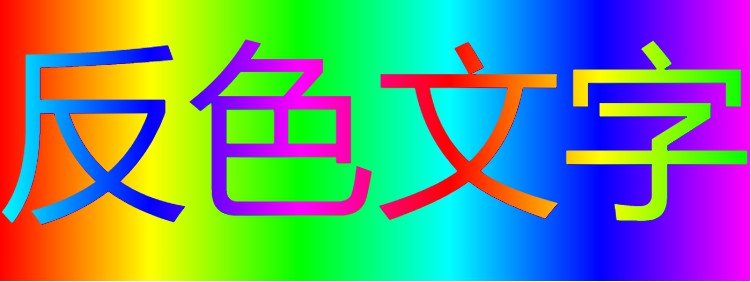
最近有一个需求,意思大概是这样:

也就是将字体颜色设置为背景色的反色。
搜索了一下,决定使用css3提供的新属性:mix-blend-mode(混合模式)
用过ps的都应该理解混合模式是一个强大的图层调色功能,和大神对各种混合特效的信手拈来不同,我对这个功能的理解非常短浅,所以也只是初步了解一下这个功能。
一、实现反色文字
首先解决一下开头的问题:
1
2
3
| <div class="background">
<div class="text">反色文字</div>
</div>
|
1
2
3
4
5
6
7
8
9
10
11
12
13
14
15
| .background {
position: relative;
width: 400px;
height: 150px;
background: linear-gradient(90deg, #f00, #ff0, #0f0, #0ff, #00f, #f0f);
}
.text {
position: absolute;
left: 0;
top: 0;
font-size: 100px;
mix-blend-mode: difference;
text-shadow: 1px 1px 0 #000;
color: white;
}
|
取字体色和背景色三通道的差的绝对值作为结果,也就是:
最终通道值 = | 对应字体色通道值 - 对应背景色通道值 |
(mix-blend-mode: difference;原理)
二、mix-blend-mode属性值
1
2
3
4
5
6
7
8
9
10
11
12
13
14
15
16
17
18
19
20
21
22
| div {
mix-blend-mode: normal;
mix-blend-mode: multiply;
mix-blend-mode: screen;
mix-blend-mode: overlay;
mix-blend-mode: darken;
mix-blend-mode: lighten;
mix-blend-mode: color-dodge;
mix-blend-mode: color-burn;
mix-blend-mode: hard-light;
mix-blend-mode: soft-light;
mix-blend-mode: difference;
mix-blend-mode: exclusion;
mix-blend-mode: hue;
mix-blend-mode: saturation;
mix-blend-mode: color;
mix-blend-mode: luminosity;
mix-blend-mode: initial;
mix-blend-mode: inherit;
mix-blend-mode: unset;
}
|
至于他们能生成什么奇妙的效果呢,可以去参观一下这个大佬的作品:https://www.cnblogs.com/coco1s/p/6829372.html